Now on iPhone and Android

Catch and Pin.Keep your world close.

Save what catches your eye. Create with what inspires you. And send a little Pin to the people on your mind. Your ideas and your favourite humans, a little closer.

Live on iPhoneLive on AndroidChrome extension available ↗
A little world of your people
Cat characterMaya
Frog characterYou
Robot characterArjun
Dog characterSam
A little “thinking of you.”
Maya pinned youGood finds. Good friends. Meet People →
A little curiosity goes a long way

Meet People · Inside Remanence

Some things you save.
Some people you Pin.

Your favourite humans deserve a little space here, too. Connect with friends. Send a nudge. Make someone’s moment.

A small gesture, a real connection

One tap. A little hello.

Tap Pin beside a connected friend. It’s a personal nudge for those moments when someone crosses your mind.

Find your people in PIN

Your connection doesn’t open your private library.

THE LITTLE HELLO LABInteractive demo
Your frog avatar in the demoYou
Maya’s cat avatar in the demoMaya

Someone on your mind?

You and Maya are connected.

Try it. Send Maya a personal Pin.

A preview with fictional friends. No real Pins are sent.

01 / Your circle

Both people say yes.

Connections start with a request and an acceptance.

02 / Your library

Private stays private.

Invite friends to a shared collection separately when you want to share saves.

03 / Your pace

Close, with boundaries.

Mute notifications, restrict Pins, disconnect or block. You’re in control.

There’s more to come back to

Less lost inspiration.
More little beginnings.

01 / REVISEMake room for what matters
DESIGN / SAVED LAST MONTH

A little space for a big idea.

That reading corner you wanted to make.

Try a sample round. Your real saves aren’t affected.

Give “saved for later” its moment.

Revisit older saves in small rounds. Keep what still speaks to you; move the rest to recoverable Trash. Find Revise beside Search in Pins.

02 / NOTES THAT DO MORECatch → Analyse → Create
YOU SAVED AN ARTICLE

The art of noticing
the everyday.

YOUR NOTE

“Write five hooks for this.”

PEBBLE / EXAMPLE OUTPUT

01   Your next idea might be hiding in plain sight.

02   Start with what you almost walked past.

A starting point, grounded in your save.

Save the spark. Add a next step.

A capture note can ask Pebble to summarise, research or create. After enrichment, it can work in the background and keep the result with your pin.

A LITTLE INTERNET. YOUR OWN PIN.

Don’t just read about it.
Catch something.

Share a post. Give it a home. Make something from it.
This is your space to try PIN—no account needed.

PLAYABLE PRODUCT DEMOFictional posts. Prepared AI examples.
Nothing is shared outside this page.
Pebble, your guide

I’m Pebble. Your next idea is hiding in something you’ve already noticed. Find a post below and share it with me.

1234
Your inspiration starts here
MC
Maya ChenMakes things. Shares the messy middle.
···

Your finished work is the reveal. The messy first draft is the story. Try this for your next video: show the version you nearly deleted, explain ONE change, then reveal where it landed. People can learn from the bit you usually hide.

Sample post · X
NE
Noah EllisType enthusiast
···

Same words. Different hierarchy. Before changing the font again, try changing the space around it. Give the headline room. Make the supporting line quieter. Let one thing lead.

Sample post · X
SR
Sam RiveraCollecting places, not checklists
···

My travel saves used to be a pile of café links. Now I add a note: ‘quiet place to read’ or ‘breakfast before the train’. Future me doesn’t need another pin on a map. Future me needs the reason I kept it.

Sample post · X
Fictional people and posts, made for this demo.
9:41PIN DEMO

Pins

Catch and pin. Find within.

0 SAVED
Pebble

A little empty. Full of possibility.

Share a sample post into PIN. It will appear here with its summary, notes and collections.

No wrong turns here. Try the five PIN tabs. Your saves stay with you as you explore.

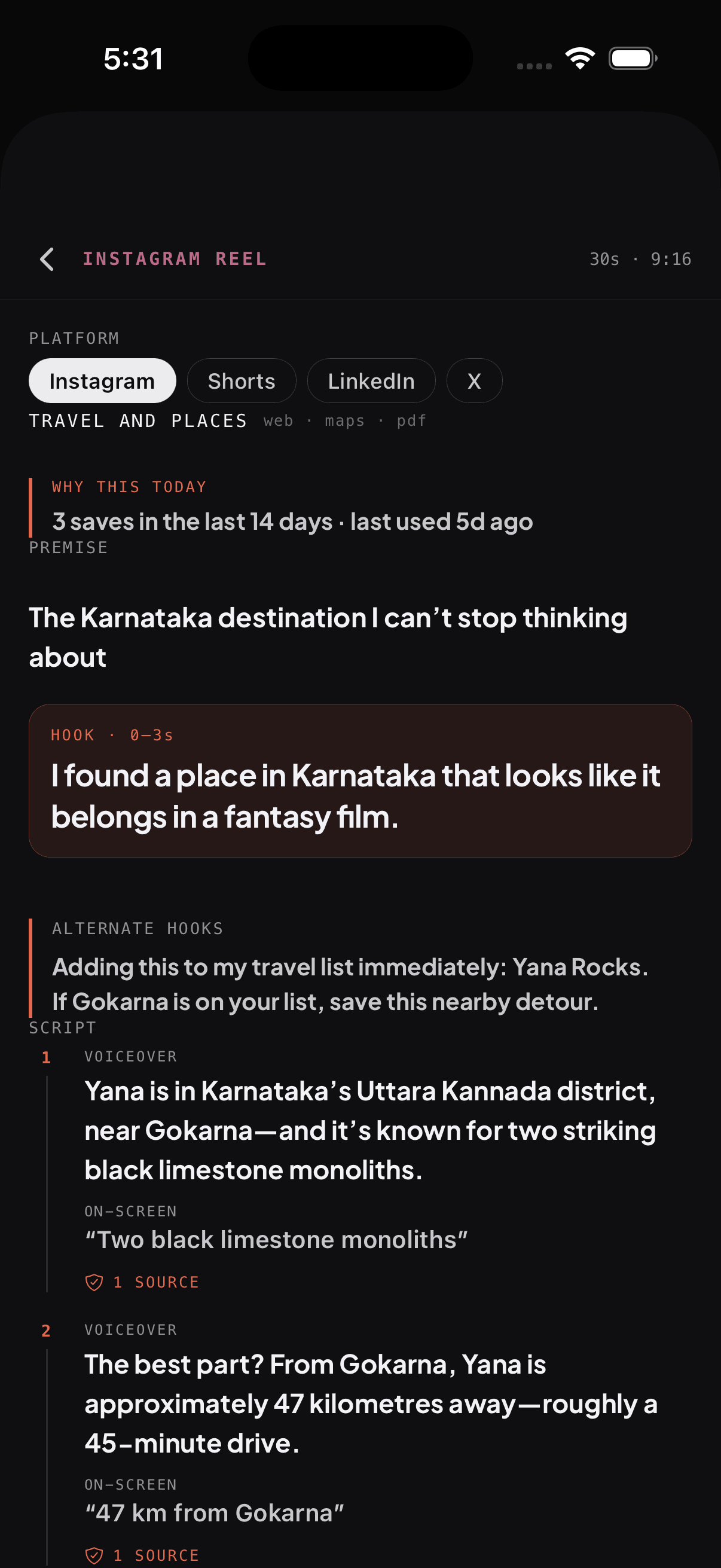
Studio · Make something from it

Your next post starts with what you save.

Studio connects your saved interests with research to create content ideas, scripts and posts for Instagram, YouTube, LinkedIn and X.

Make a sample draft in Studio →
  1. 01 · Give it your direction.

    Set up your creator profile with your audience, goals and style. Select saved work as voice references.

  2. 02 · Explore the possibilities.

    Open a content pack, compare hooks and explore the formats that fit your platform.

  3. 03 · Make the draft your own.

    Review the research and source receipts, adapt the output, and save it to your library. You bring the final perspective.

Try a sample with Pebble →
Studio reel draft with platform choices, alternate hooks and a source receipt for a script claim
Inside PIN · Studio on iPhone. AI drafts need your review.

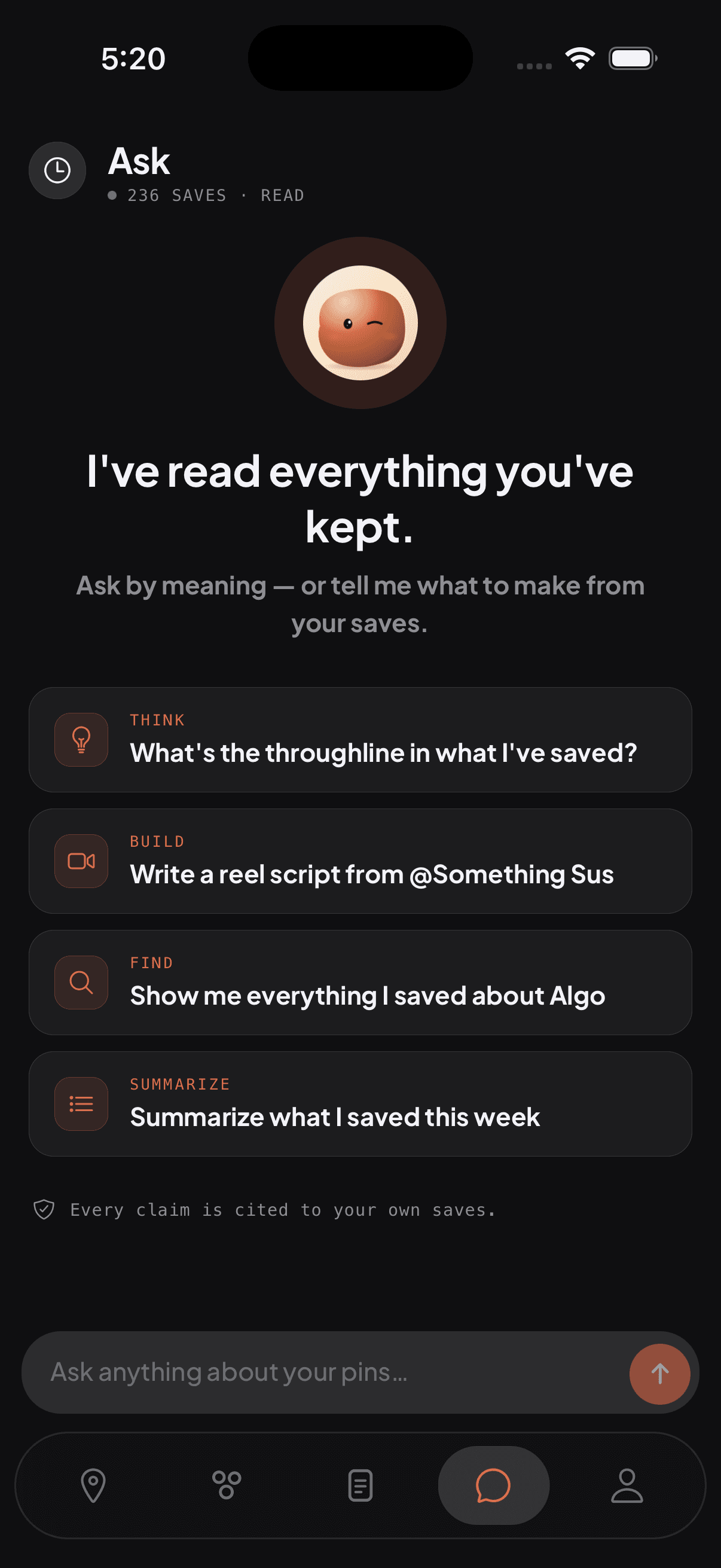
Ask Pebble · Find within

A little help connecting the dots.

Describe the idea you remember. Ask about a saved video, pull together references, or explore a question across your library. Pebble can use your saved content and search the web when it needs more context.

Ask Pebble about your demo saves →

Your library goes with you.

Search downloaded pin text and notes offline. Asking Pebble, generating in Studio and syncing shared collections need an internet connection. Original videos and external media may need one too.

PIN’s Ask screen with Pebble and suggested questions about saved content
Inside PIN · Ask on iPhone

PIN for Chrome · Catch it where you find it

Big browser rabbit hole.
One little Pebble.

Save a page with ⌘⇧S on Mac or Ctrl + Shift + S on Windows and Linux. Or click the floating Pebble button. It lands in the same PIN account, ready to sync to your app.

Want to choose a collection? Use ⌘⇧E or Ctrl + Shift + E. Sign into the extension with the same account you use on your phone.

Pebble, the floating save button in PIN’s Chrome extension

Found something good?

Your library is a shortcut away.

⌘shiftS

The extension captures pages; your library, collections and creative tools live in the PIN app. Browser restrictions and shortcut conflicts may apply.

Built for the long game

A place your saves can grow into.

Fast enough for the impulse to save. Structured enough for years of ideas. Intelligent enough to make the archive useful again.

01

Universal capture

One home for every format

Posts, reels, videos, articles, screenshots, photos, PDFs, notes and places live together without becoming a junk drawer.

Explore in the demo →
02

Organize

Collections that bend around you

A pin can live in zero, one or many collections. Build a moodboard, swipe file, trip plan or shared reference set.

Explore in the demo →
03

Fast & resilient

Local-first by design

Capture now, sync when you’re online. Previously downloaded content can reopen offline; fresh research and AI generation need a connection.

Explore in the demo →
04

Reminders

A nudge at the right moment

Choose a preset or a custom time from a pin, the composer or either mobile share flow. Manage them together in Account → Reminders. Alerts need notification permission.

Explore in the demo →
05

Notes with purpose

A note can be a next step

Add “summarise this” or “write five hooks” as you save. After processing, Pebble can work on that instruction in the background and keep the result with the pin.

Explore in the demo →
06

Reader mode

Articles made calm

For supported articles, PIN saves a clean reader version so research stays readable, focused and available later.

Explore in the demo →
07

Collaboration

Share the collection, not your account

Invite people to a collection, choose who can view or contribute, and discuss saves in comments. You can also publish a collection with a public read-only link.

Explore in the demo →
08 · Private by default

Your own space for inspiration.

Connecting with friends doesn’t expose your library. Choose what to share through collections, and export or delete your own data from Account.

A few useful answers

Before you pin it.

Still wondering about something? Write directly to the person building it.

founder@catchandpin.app ↗
01What does it mean to Pin a friend?

A personal Pin is a little nudge to a connected friend. It does not send a saved item or a text message. Open Remanence → Your people, request a connection with their PIN email, and wait for them to accept. Then tap Pin beside their name.

02What happens when someone Pins me?

Open Pinned you in People. Yay sends a Pin back. Nay dismisses the incoming Pin and sends a Nay response. You can also mute notifications, restrict incoming Pins, disconnect or block someone.

03Can my friends see everything I save?

No. A People connection does not give anyone access to your library. Shared collections use a separate invitation and role. Contributors can add saves and participate in comments; viewers have read-only access. A public collection link lets anyone with the link view that collection.

04What is Revise?

Open Revise beside Search in Pins to revisit up to ten eligible older saves. Keep pauses a save from Revise for seven days on this device. Trash moves it to Recently Deleted, where it can be restored within 30 days. Undo is also available during the round.

05What can I save to PIN?

Anything you can share: Instagram posts and reels, YouTube videos, X and Threads posts, TikToks, webpages, articles, screenshots, photos, PDFs, maps, music and plain-text thoughts. They all land in the same private library.

06How is this different from bookmarks or ‘Save’ inside an app?

Those saves stay trapped in separate platforms. PIN captures them into one place, enriches what it can understand, lets you search across formats, and gives Pebble the context to answer questions or create from your library.

07What does Pebble actually understand?

Depending on the format, Pebble can work with article text, video transcripts, on-screen words, image contents, metadata and the notes you add. Answers are grounded in your library and point back to the original pins.

08Is PIN only for content creators?

No. Creators get powerful script and research workflows, but PIN is equally useful for recipes, travel, design references, reading lists, shopping research, places and anything else you save for later.

09What happens to my data?

Your library is scoped to your account. There is no social feed and PIN does not sell your saves. You can export your data or delete your account and library from inside the app.

10Where can I download PIN?

PIN is live on the iPhone App Store and on Google Play for Android.